Tampilkan postingan dengan label Control Panel. Tampilkan semua postingan

New version of the Google Admin app on iOS

New version of the Google Admin app on iOS
A new version of the Google Admin app for iOS is now available in the App Store. The app lets admins manage their Google for Work products on the go with their iPads and iPhones. This latest release (v1.1.0) contains the following features:

  • Instant search for finding users
  • Unifying the search fields for first name and last name for ease of use
  • Ability to switch between multiple accounts quickly
  • Conforming the UX to iOS 7 guidelines
  • Adding a settings page with settings like remember password, etc
  • Accessibility fixes

Release track:
Rapid release and Scheduled release

For more information:
Get the Google Apps Admin app on the App Store


Note: all launches are applicable to all Google Apps editions unless otherwise noted

whatsnew.googleapps.com
Get these product update alerts by email
Subscribe to the RSS feed of these updates
Manage Chrome policies on Android and iOS from Google Admin console

Manage Chrome policies on Android and iOS from Google Admin console

Since April 2013, admins have had the capability to set 100+ Chrome policies for users on Chrome Devices, Windows, Mac, and Linux when they sign-in to Chrome with their Google Apps account.


Today we are providing an early preview of applying some of these same policies to Chrome on Android and iOS as well. For example, you set bookmarks through the Managed Bookmarks setting on Google Admin console and it gets pushed to Chrome on all 6 platforms, including mobile. Similarly, you can set the Proxy policy or the Password Manager policy once and it will apply on Chrome on all 6 platforms. For more information on how to turn on this early preview feature, please see the link below.


For more information:
Apply policies to Chrome on Android and iOS

Note: all launches are applicable to all Google Apps editions unless otherwise noted

whatsnew.googleapps.com
Get these product update alerts by email
Subscribe to the RSS feed of these updates

More transparency for reporting data in Admin console and API

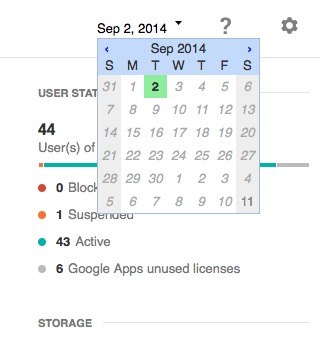
We have introduced a date picker at the top right of the Reports section in the Admin console to provide additional transparency into any reporting delays and unblock partial data feeds in the event some data is unavailable.

The latest date for which all data points are present (usually 2 days prior to the current day) has a green background. When this date gets delayed beyond the standard 2 days delay, admins can choose a later date to access data which is not delayed and is available at the selected date:


On the API side, the API will return data for the latest available report date and admins will be able to select older dates when data gets delayed. The API will also return a warning if some of the data is missing.

Release track:
Rapid release and Scheduled release

For more information:
Help Center


Note: all launches are applicable to all Google Apps editions unless otherwise noted

whatsnew.googleapps.com
Get these product update alerts by email
Subscribe to the RSS feed of these updates

View event support in Google Drive audit logs

View event support in Google Drive audit logs
Currently, Google Apps Unlimited customers are able to access Drive audit logs using the Reports API and in the 'Audit' section of the Admin console reports. The current Drive audit logs include events such as create, upload, edit, rename, move, add to folder, remove from folder, trash, delete and untrash. We are now adding view event support to the Drive audit logs.

View event will cover file views for Google and non-Google file formats. Admins will also be able to filter on view events and combine that with other filtering criteria like document name, user name and timestamp.

Release track:
Rapid release and Scheduled release

For more information:
Help Center


Note: all launches are applicable to all Google Apps editions unless otherwise noted

whatsnew.googleapps.com
Get these product update alerts by email
Subscribe to the RSS feed of these updates

New bulk mail filter in Gmail Spam settings

New bulk mail filter in Gmail Spam settings
With this new option in Gmail Spam settings, admins can turn on more stringent filtering of bulk mail using a single checkbox. This is a feature that was available in Postini, and will now be available to Google Apps customers. For migrated Postini customers, the checkbox will be enabled by default.

Release track:
Rapid release and Scheduled release

For more information:
https://support.google.com/a/answer/2368132

Note: all launches are applicable to all Google Apps editions unless otherwise noted

whatsnew.googleapps.com
Get these product update alerts by email
Subscribe to the RSS feed of these updates

Remotely manage Chromebox video meetings

Remotely manage Chromebox video meetings
Admins can now better manage video calls in Chromebox for meetings devices right from the Google Apps Admin console, with options like remotely starting, muting and hanging up a meeting. Meeting participants are still in full control of the device in their conference room, even if the video call is started remotely. For example, meetings are muted by default, but participants can unmute the microphone using the remote control if they need to be heard. They can also end the call or perform any other task available on the device. Release track:
Rapid release and Scheduled release For more information:


Note: all launches are applicable to all Google Apps editions unless otherwise noted

whatsnew.googleapps.com
Get these product update alerts by email
Subscribe to the RSS feed of these updates